Kitchen display
The tablet in your stockroom is a kitchen screen
Orders arrive the second a waiter sends them, in the order they were sent, with the note the guest actually gave. Nobody squints at handwriting and nobody walks to the pass to ask what is next.
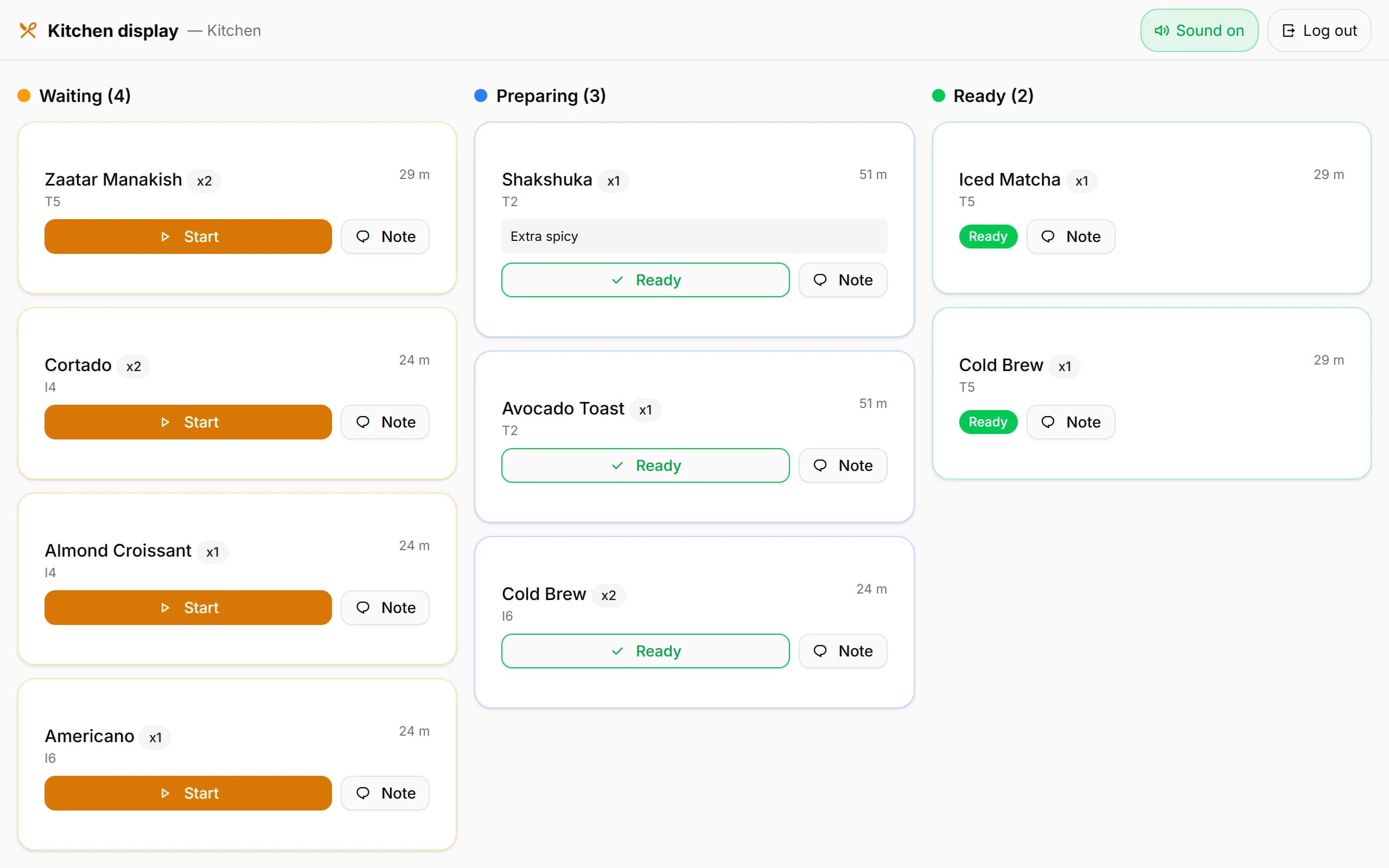
How it reads
Three columns and one tap between them
A chef with wet hands has about one second of patience. So there is one button on each card, and it does the obvious thing.
Waiting
The item has been sent and nobody has picked it up yet. New arrivals land here.
Preparing
Someone tapped Start. The rest of the kitchen can see it is being worked on.
Ready
Tapped Ready. It stays on the board until a waiter takes it to the table and marks it delivered — so nothing is lost between the pass and the floor.
Above the columns sit four counts — waiting, preparing, ready, and everything finished today. It is the quickest way to tell whether the kitchen is behind before anyone complains.
What the kitchen gets, without buying anything
A tablet, a browser, nothing else
Open the kitchen address on whatever tablet or old laptop is going spare, lean it against the wall, and that is the display. There is no hardware to buy and nothing to install.
Its own login, and only this
You create a kitchen username and password in the panel. That account can reach the kitchen screen and nothing else — not sales, not the menu, not your takings.
How long it has been waiting
Every card carries its own age, from just now through to two hours ten minutes. The oldest ticket stops being a matter of opinion.
A chime you can turn off
New orders ring; cancellations do not, because a noise that means two different things gets ignored. The sound, its volume and the toggle are all yours to set.
Notes and extras on the card
The guest's note and every modifier are printed on the ticket card itself. The kitchen can also write back to the waiter and the till — for example when something has run out.
A running out-of-stock list
Anything the kitchen flags as low or finished sits at the top of the screen until somebody closes it with Restocked. The floor stops selling what you do not have.
Running before the lunch rush
Create a kitchen user
One username and password in the panel, made by you in about a minute. Add more if different people want their own login — they all see the same board.
Open the address on the tablet
The panel gives you the link to copy. Sign in once — the session is deliberately long, because that tablet stays on all day.
Start taking orders
Tickets appear as waiters send them. The screen also refreshes itself on a timer, so a dropped connection catches up on its own.
Add a printer only if you want one
The screen works perfectly well with no printer at all. Paper is an option, not a prerequisite.
If you still want paper
Printed tickets, for the sections where a screen will not survive
A small program on the Windows PC at your till carries orders to a thermal printer on your own network. It dials out like a browser and opens nothing on the machine it runs on.
Any network ESC/POS printer
An 80mm thermal printer on your own network, reached over the standard port. No brand lock — if it speaks ESC/POS it works, and a model without a cutter simply does not cut.
You choose what triggers it
Print on waiter and till orders, on approved QR orders, both, or neither. Nothing prints while the printer is switched off in settings.
Tickets survive the printer being off
If the printer is unplugged or asleep, the ticket waits in a queue rather than vanishing, and prints when it comes back. The waiter is told on the spot that it is queued.
It will not print twice
Every ticket is acknowledged once and remembered, and only one bridge can be live per venue. A reconnection replays what was missed, not what already printed.
Read this part twice
What the kitchen side does not do
None of these is on a roadmap slide. They are simply not built, and you deserve to know which ones matter to your kitchen before you spend a month trialling anything.
Printed tickets are not in Arabic
The printer bridge encodes text for a Latin code page. Arabic on a printed ticket is not supported — not badly supported, not supported. The screen is English, as the rest of the panel is.
The bridge program itself speaks Turkish
The little Windows program that drives the printer has not been translated yet. Its setup is four questions and we will walk you through them, but you should know before you see it.
One printer per venue
There is no routing of hot food to one station and drinks to another. Every ticket goes to the same printer.
No bump bar, no recall
It is a touchscreen. There is no hardware bump bar, and a ticket marked ready cannot be pulled back onto the board.
Questions people actually ask
- Does the kitchen need a printer at all?
- No, and most venues that start with the screen never add one. The printer exists for kitchens where a screen is impractical — a wet section, a grill, somewhere a tablet would not survive a week.
- What does the printer setup actually involve?
- A small program on the Windows PC at your till, the printer's IP address, and a token you copy from the panel. The program only makes outgoing connections and opens no ports on the PC, and there is a test print button to prove it before service.
- Do takeaway orders print?
- No. Takeaway runs on its own board with its own numbered tickets and is never sent to the printer automatically. Takeaway items do still appear on the kitchen screen.
- How does the waiter know the food is ready?
- The moment the kitchen taps Ready, the waiter's phone buzzes and shows which table and which item. There is also a queue page listing everything waiting to be carried out, filtered to their own tables or to all of them.
- What if the tablet loses Wi-Fi for a minute?
- It reconnects and catches up by itself. Alongside the live connection the board reloads on a short timer, so a brief drop costs you nothing more than the delay.
- Can one screen show only the hot section?
- Not today. Every kitchen screen shows the whole board. If you need separate stations, the honest answer is that this is not built yet — we would rather say so than sell you a plan.
Put it on a tablet tomorrow and watch one service
Thirty days, no card. If the kitchen hates it after a week, you have lost a week and nothing else.