The café POS that runs on the phones you already own.
Kafe360 takes the order at the table, sends it to a kitchen screen and puts a QR menu on every table. No terminals to buy, nothing to install. $249 a year after 30 days free.
$249 a year. One plan, everything included.
30 days free No card Open in 7 countries
OPEN TO VENUES IN
- Australia
- New Zealand
- Qatar
- Singapore
- South Africa
- United Arab Emirates
- United Kingdom
Your menu, bills and reports run in your own currency and time zone. Not on the list? Tell us where you are
Watch one order travel from the table to the kitchen.
Four short walk-throughs. Pick one and let it play.
These are simplified walk-throughs. The real screens are just below.
Four screens, and you already own the devices.
Waiters order from their own phones, the kitchen runs on any tablet, guests scan the table QR — and you see what sold, on which table, on which day, from wherever you are.
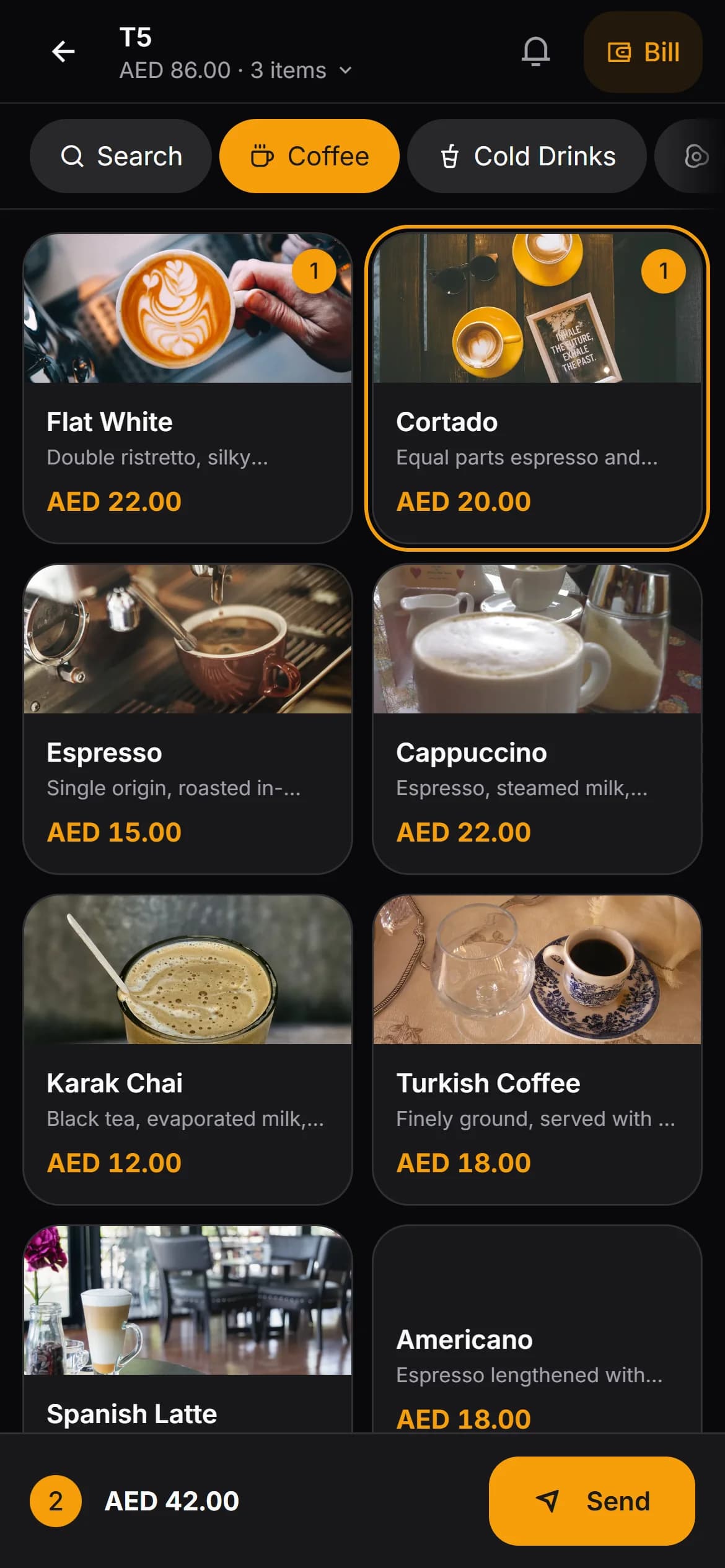
Waiter's phone
Their own phone, in the browser. Pick the table, add items, send.
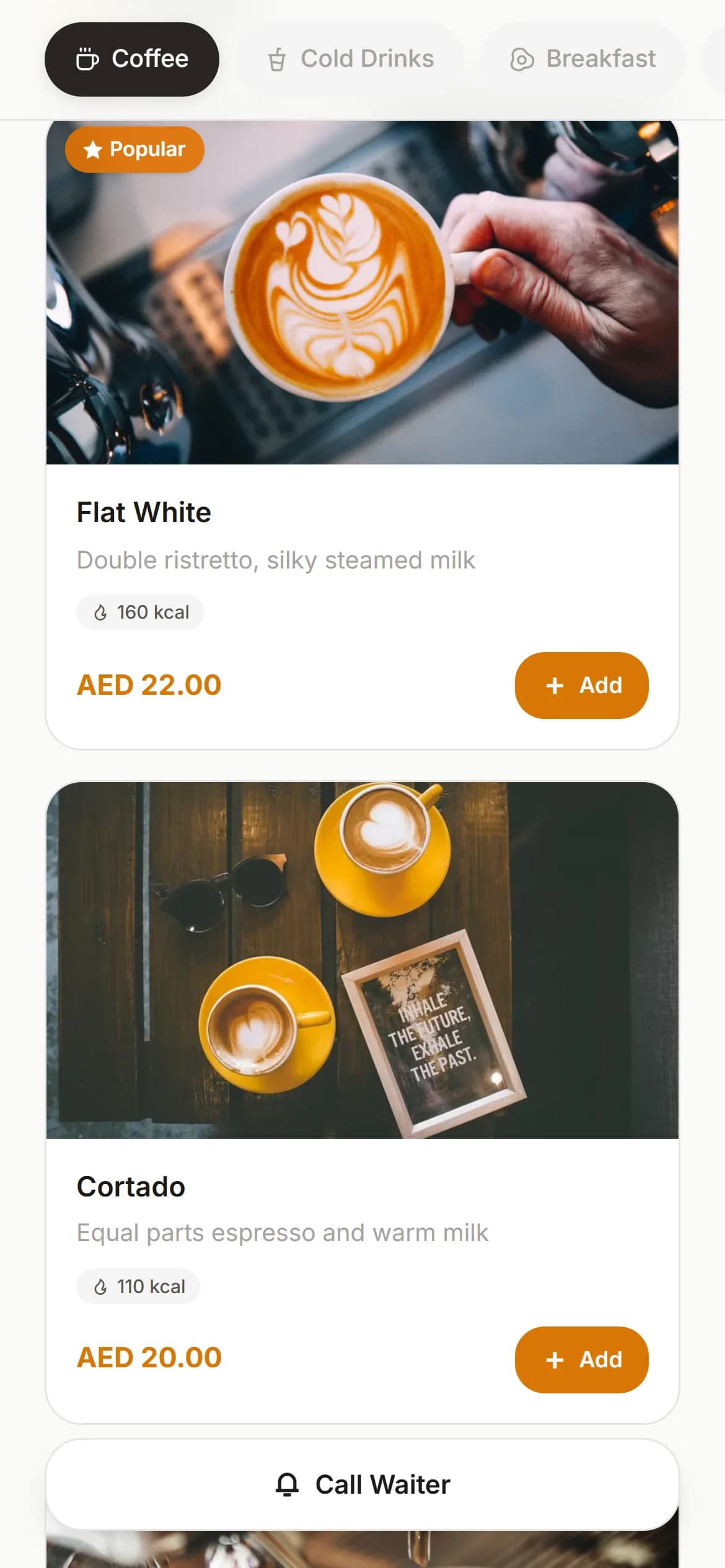
Guest's phone
Scans the table code, sees the current menu with photos and allergen filters.
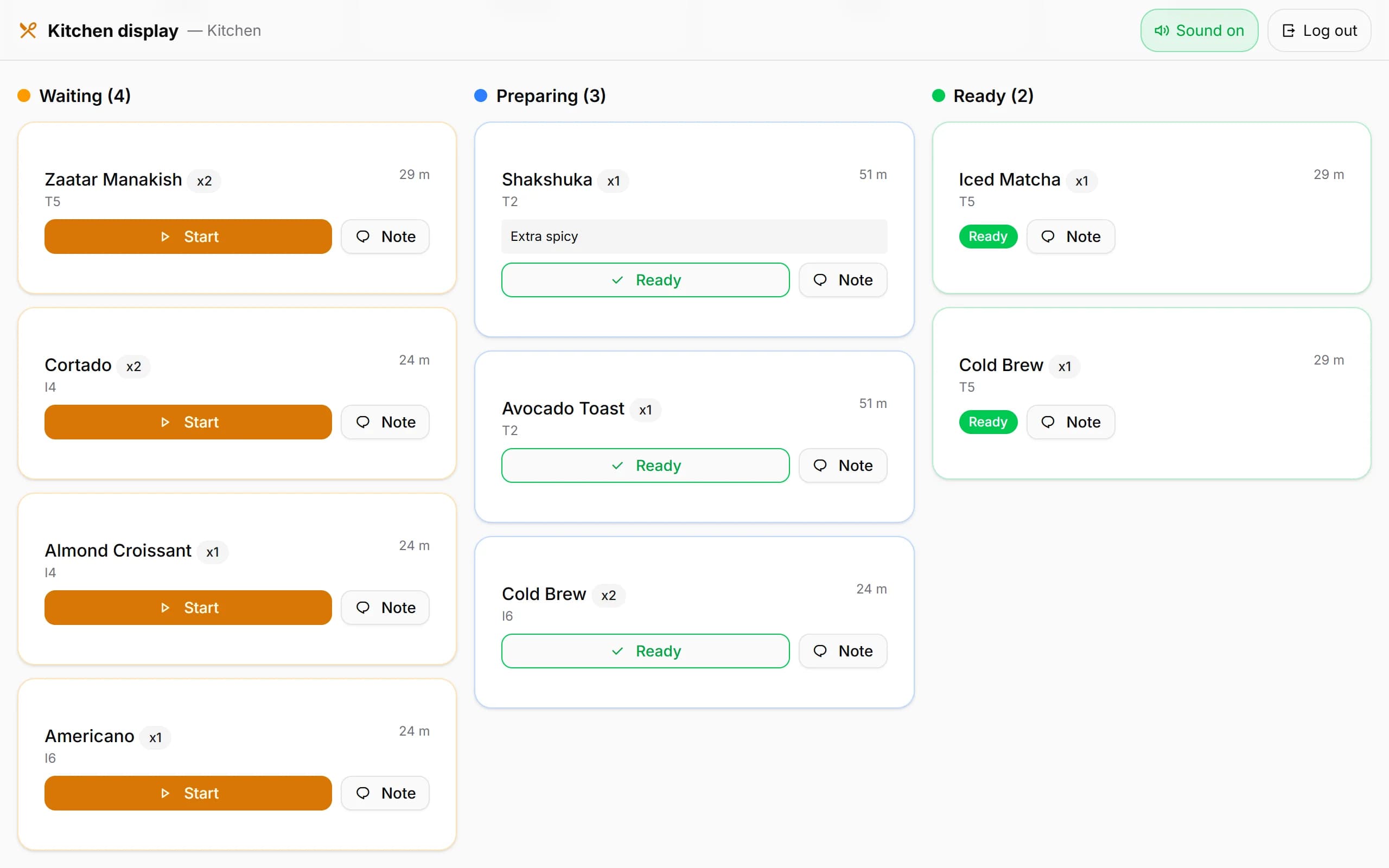
Kitchen tablet
Tickets arrive as they are sent. Waiting, preparing, ready, one tap each.
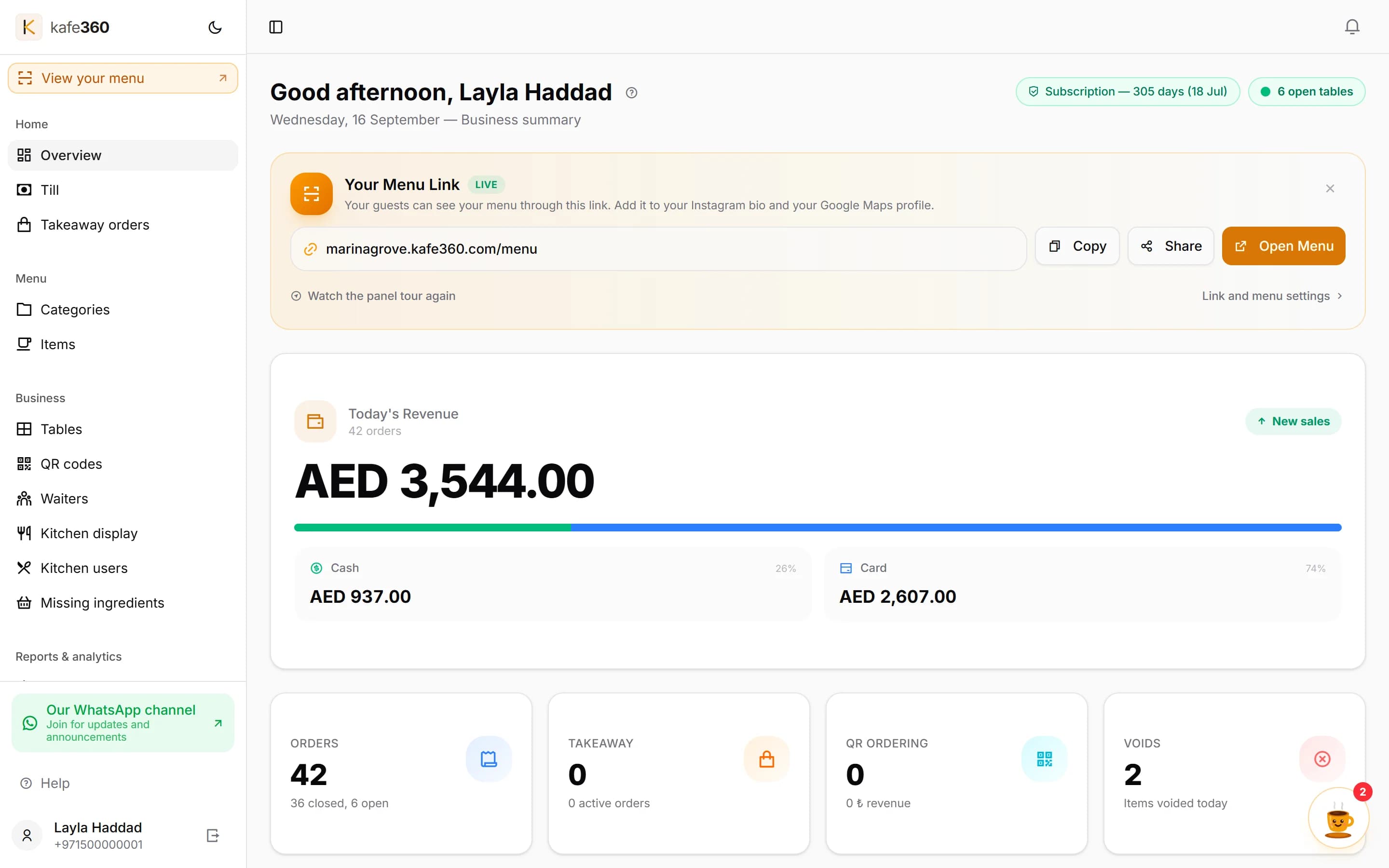
Your laptop, wherever you are
Today's takings, open tables and what sold, from home or another venue.
Real screens from the product. The venue and the amounts are sample data.
Everything a service needs, in one subscription.
Eight parts, each with its own page showing the real screens and saying where the feature stops.
CUSTOMERS
160+ cafés and restaurants open it every morning.
All of them are in Türkiye, where we started. Venues that keep their menu public have a link on their card — open one and see what your guests would see.
Set it up in an afternoon.
Nothing to install, nothing to deliver, no engineer to book. You will spend most of the time typing your own menu in.
Create the account
A few details about your venue, an email and a password. No card is asked for, and nobody calls you — you are inside the panel straight away.
Add your menu and your floor
Categories, items, photos, and your tables grouped by area — terrace, inside, bar. Typing the menu in is the long part; everything else is a few clicks.
Give your waiters a PIN
Each waiter gets a six-digit PIN. The first time they sign in on a new phone you approve it from your own screen, and you can end any session later.
Open the kitchen screen and start
Print the table QR codes, open the board on a tablet in the kitchen, and take the first order the same afternoon.
No card, and nobody calls you.
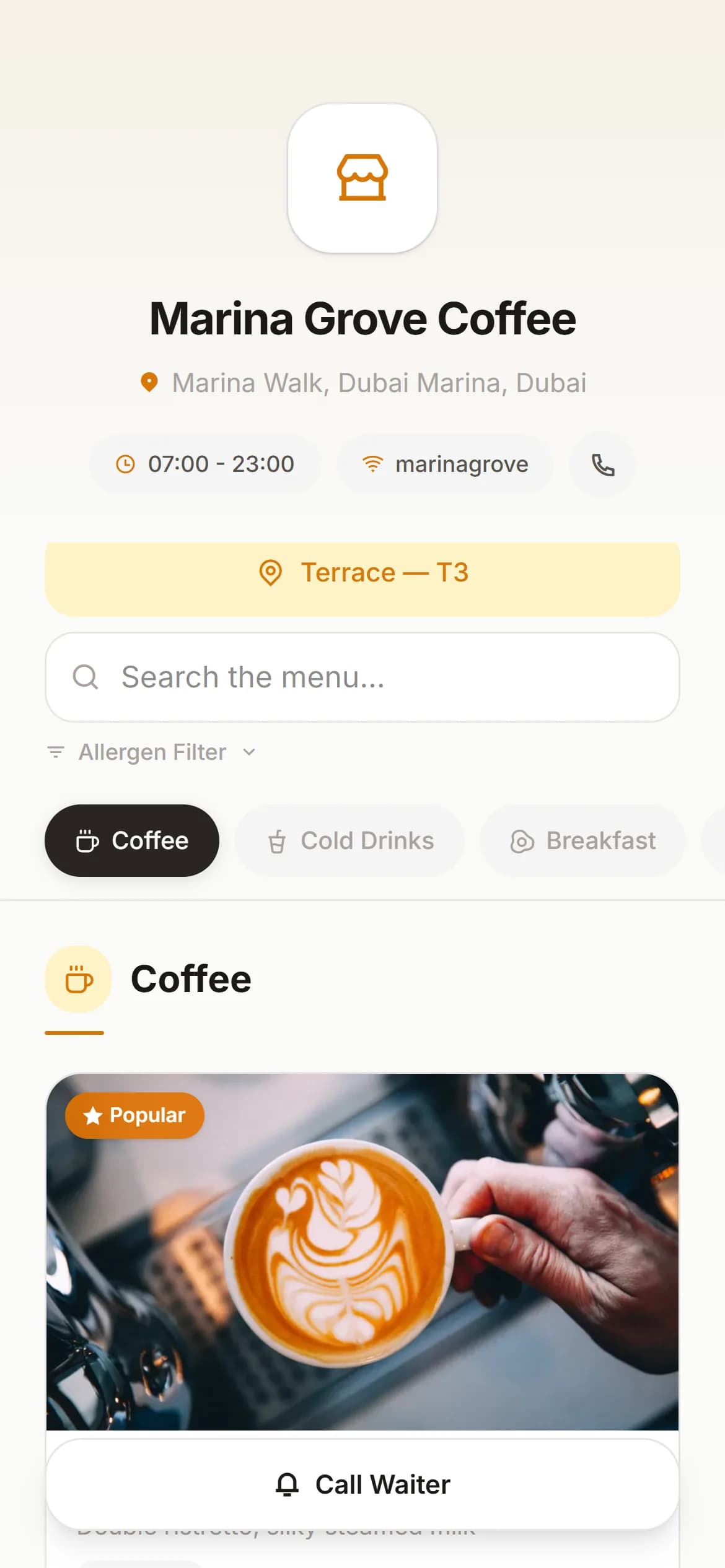
Put your menu on the table tonight. Keep it free for good.
This is the plan most of our venues actually run. A QR code on every table, your menu behind it, and nothing to pay — not for a trial period, not ever.
- Up to 500 items across 50 categories, with a photo on each
- Ten menu languages, right-to-left included
- Sell out of something at 8pm and hide it in two taps
- Nothing is retyped if you move up to the full system
Most of the 160+ venues on Kafe360 run on the free plan today. It is a menu and not a till — taking orders and printing to the kitchen are part of the paid plan.
One plan. $249 a year. Everything included.
Try the full system free for 30 days, or keep the QR menu free for good.
A QR menu on every table.
Create a free QR menuNo card. No end date.- Up to 500 items, 50 groups
- Photos and allergen filters
- Ten menu languages
- Your menu found on Google
About $21 a month, paid once a year.
Start 30 days free- Everything in the free plan
- Orders, tables and split bills
- Kitchen display and printer
- Reports, stock, house accounts
- No limit on staff, devices or items
Prices are in US dollars. You pay nothing during the trial. If you decide to stay, you pay once by card from your panel. The payment is processed by Polar, our reseller and merchant of record, which issues your invoice and handles any applicable sales tax or VAT. The total, including any tax, is shown on the payment screen before you pay.
More than one venue? $249 per venue, one panel. Talk to us →
What the annual plan opens up
Free $0 forever | Full system $249 / year About $21 / month | |
|---|---|---|
| Taking orders and running tabsNo paper dockets, no orders lost between table and kitchen | — | ✓ |
| End of day and the Z-reportCancelled items and price changes leave a trail | — | ✓ |
| Taking payment, splitting bills, merging tablesSplit item by item, cash and card recorded separately | — | ✓ |
| Waiter app and per-waiter performanceWho sold what, and which tables they looked after | — | ✓ |
| Kitchen display and thermal printerOrders reach the kitchen the moment they are sent | — | ✓ |
| Live takings and hourly salesWhich hour earns, which item actually sells | — | ✓ |
| Menu items and categoriesThe menu can grow without hitting a ceiling | 500 / 50 | Unlimited |
| QR menuThe full menu, on the free plan too | ✓ | ✓ |
| Call-a-waiter and ordering from the tableGuests call a waiter or order from the QR menu | — | ✓ |
| Start | Start free |
One payment, once a year · 30 days free before anything is charged
Pricing questions
What happens when the 30 days end?
Nothing is charged — no card is stored during the trial. We email you before it ends. If you decide to stay, you pay by card, in US dollars, once, from the Subscription page in the panel; the total, including any tax, is shown on the payment screen before you pay. The payment is taken by Polar, our reseller and merchant of record, and the invoice comes from them. If you do not, the paid features close and the account moves to the free QR menu plan, so your menu stays online.
Is there a contract or a minimum term?
No contract and no minimum beyond the year you pay for. You pay for one year at a time, by card, and nothing renews on its own. We email you before the year ends; if you do not pay again, the account moves to the free QR menu plan.
Can I get my money back?
Yes — a full refund within 14 days of your first payment. The refund policy page has the details.
Which currency am I charged in?
US dollars. If your card is in another currency, your bank converts it and may add its own fee.
Do I need to buy any hardware?
No. It runs in the browser on the phones, tablets and computers you already own. A network receipt printer for the kitchen is optional, not required.
What you need
Nothing to buy, nothing to rent. The list is short on purpose.
A phone per waiter
Any recent iPhone or Android, in the browser. Nothing to install.
A tablet or old laptop for the kitchen
Lean it against the wall and open the kitchen address.
An internet connection
This is a cloud system and orders cannot be sent offline.
Optional — a receipt printer
An 80mm network receipt printer and a Windows PC to drive it.
What Kafe360 does not do
We would rather you found these out now than in week three.
It does not take card payments.
Your own terminal does that and Kafe360 records it. We never see your guests' cards.
It is not a fiscal device.
It does not issue tax invoices or file anything with a tax office. It does not add sales tax on top of menu prices, so it works with tax-inclusive pricing only.
It does not pull in orders from delivery apps.
Orders from delivery platforms stay on the platform's own tablet.
A small team, and you talk to it directly.
A cloud system asks you to hand over your trading records. These are the answers to the questions that raises, before you ask them.
Built in Ankara, used through Friday nights
Your data sits in Germany
You can take all of it with you
We never see your guests' cards
Your currency, your clock
No sales team. That is why it costs $249 a year.
Support in English
Monday to Friday, 09:00–18:00 Istanbul time (UTC+3).
Changed your mind?
Questions people actually ask.
Longer answers, and more of them, live on the feature pages and the pricing page.
Do waiters need a special device?
No. It runs in the browser on the phone they already carry. If you would rather issue tablets that works too, but nothing about the system assumes it.
Do guests need to install anything?
No. The QR code opens a web page in whatever browser is already on the phone. A guest asked to install an app usually just asks for the paper menu instead.
Which countries can I use it in?
Today Kafe360 is open to venues in Australia, New Zealand, Qatar, Singapore, South Africa, the United Arab Emirates and the United Kingdom. You choose your country when you sign up, and your menu, bills and reports run in your own currency and time zone. Not on the list? Tell us where you are.
Does it work if the internet drops?
A red banner appears and the order cannot be sent — this is a cloud system and it is honest about needing a connection. What the waiter has already typed stays on the phone until it can go.
Which printers work with it?
Any 80mm network thermal printer that speaks ESC/POS, driven by a small program on a Windows PC at your till. The kitchen screen works perfectly well with no printer at all; paper is an option, not a prerequisite.
Does Kafe360 process the card payment?
No, and this is worth being clear about. We are not a payment processor and we never touch the guest's card. You take the money the way you already do and record which it was.
Is it a tax or fiscal system?
No. A tax line can be shown on a guest receipt, and that is the whole of it. There is no tax return, no fiscal report and nothing is filed with any authority. It does not add sales tax on top of menu prices, so it works with tax-inclusive pricing only.
Can I export my data?
Yes. A full export — orders, payments, items, end-of-day snapshots, stock, customer accounts — as CSV files in one ZIP, switched on for your account.
Which currency and clock does it use?
Both come from your venue's own setting. A café in London sees £1,250.50 on UK time, one in Toronto sees $1,250.50 on Eastern time — on a 12-hour clock, and not converted from anything.
Which currency am I charged in?
US dollars. If your card is in another currency, your bank converts it and may add its own fee.
Is there a contract?
No contract and no minimum beyond the year you pay for. You pay for one year at a time, by card, and nothing renews on its own. We email you before the year ends; if you do not pay again, the account moves to the free QR menu plan.
What happens when the trial ends?
Nothing is charged — no card is stored during the trial. We email you before it ends. If you decide to stay, you pay by card, in US dollars, once, from the Subscription page in the panel; the total, including any tax, is shown on the payment screen before you pay. The payment is taken by Polar, our reseller and merchant of record, and the invoice comes from them. If you do not, the paid features close and the account moves to the free QR menu plan, so your menu stays online.
Can I use just the free QR menu and nothing else?
Yes. Plenty of venues run only the free QR menu and never take an order through us. Taking orders, the kitchen screen and daily sales are the parts that need the paid plan.
Run one real service on it.
Thirty days, your own menu, your own staff, no card.