Order management
The order is taken at the table and never retyped
Your waiter stands where the guest is sitting, takes the order on their own phone and sends it. It is in the kitchen before they have walked back. Nothing is shouted, nothing is on a pad, and nothing is keyed in a second time at a terminal.
Working today in more than 100 venues. Nothing on this page is a roadmap.
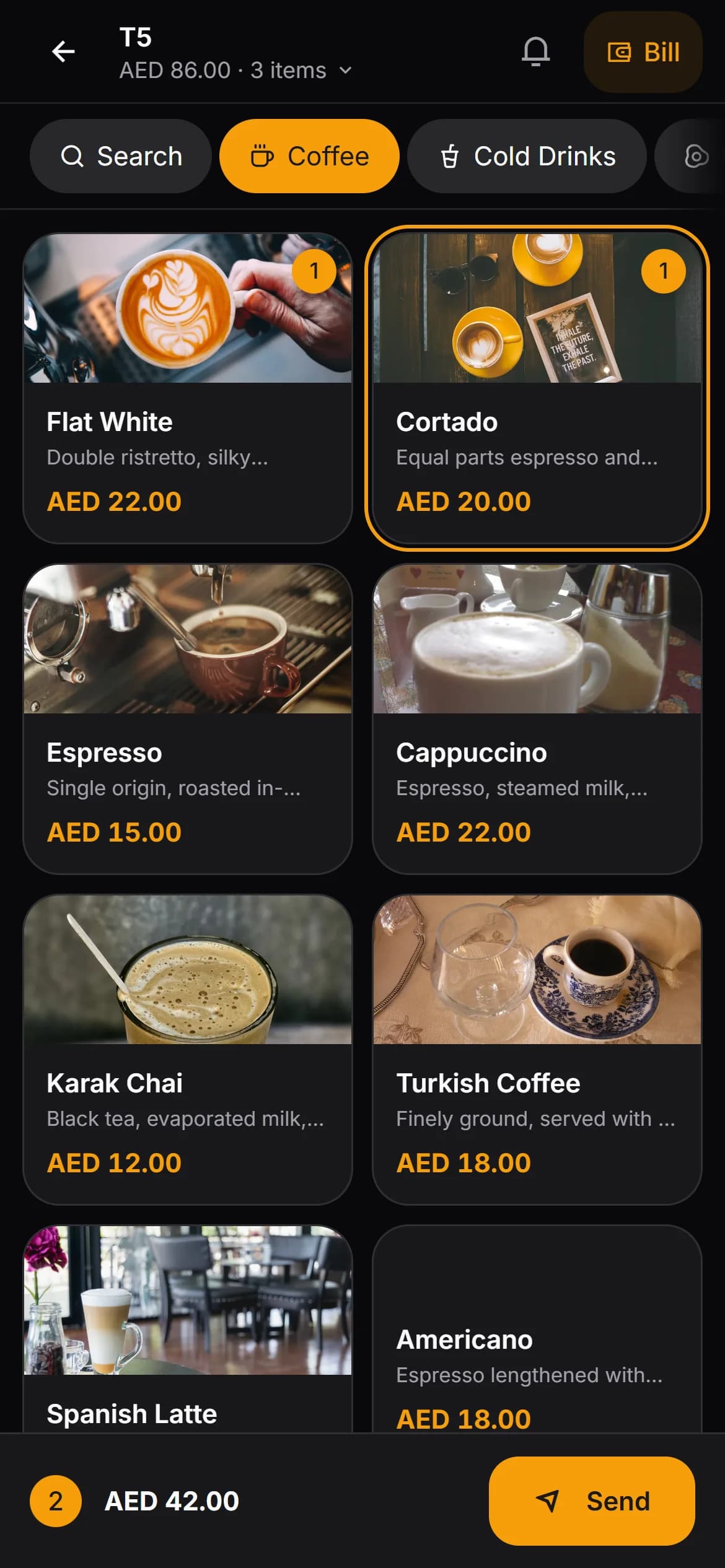
Taking the order
Built for the busiest twenty minutes of your day
Every tap target is big enough for a thumb in a hurry, and the running total sits at the bottom of the screen the whole time.
The floor, the way you laid it out
Tables grouped by section — terrace, indoor, garden, bar. Free, in use and awaiting payment are three different colours, and every busy table shows how long it has been open. A waiter assigned to a section opens on their own section first.
Find the item in two taps
Categories along the top, items underneath, and a search box for the days when the menu is long and the queue is longer.
Notes the kitchen will actually read
Save the notes you keep repeating — less sugar, no ice, extra hot — and tap one instead of typing it. Free text is there when the guest asks for something new.
Extras with their own rules
Modifier groups per item, with a minimum and maximum choice, their own prices and a quantity where it makes sense. Required groups cannot be skipped by accident.
Covers, not just tables
The waiter enters how many people are sitting down. That is what turns your takings into an average spend per cover later on.
One bill, several rounds
A second round is added to the order that is already open. Nobody starts a new bill, and nothing gets keyed in twice.
Four states, and everyone can see which one applies
Each item moves through these on its own. A steak and the coffee that follows it are not stuck together.
Waiting
The order has been sent and the kitchen has not started it.
Preparing
Someone in the kitchen has picked it up.
Ready
It appears in the waiter's own queue — mine or all tables — so it is collected while it is hot.
Served
Marked delivered by the waiter who took it to the table.
Settling up
The awkward part of service, handled at the table
Six friends, one bill and three cards is the moment most systems fall apart. This one does not need a calculator or a second trip to the till.
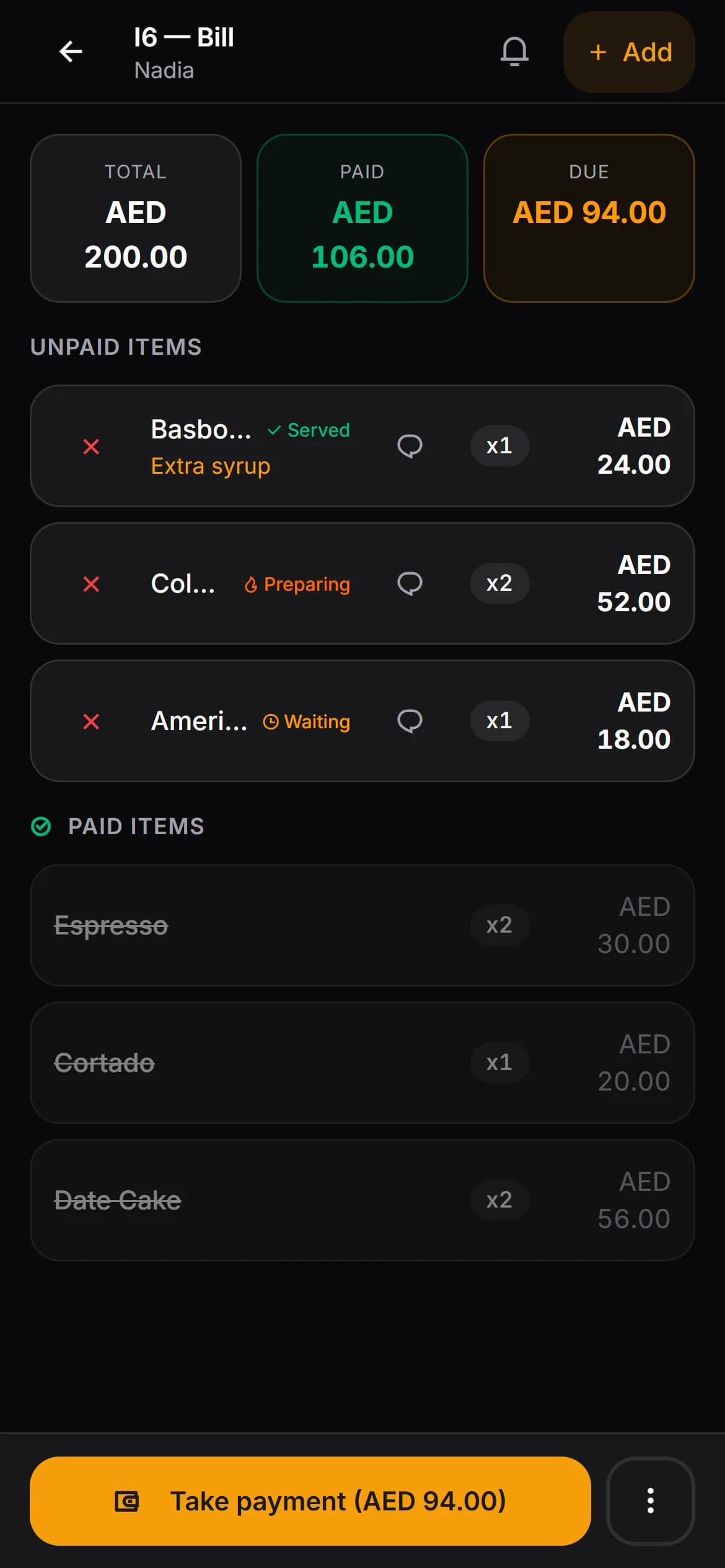
- At the table — settle the whole bill, or take the amount a guest hands over and leave the rest open
- At the till — tick the exact items one guest is paying for and close only those
- Cash with the change worked out for you, card, or charged to a customer account
- Paid and unpaid items stay apart on the bill until the last one is settled
- Move an order onto a free table, or merge two tables into a single bill
- Print a guest receipt at the till once the bill is fully paid
What it remembers
The things you only miss after they have cost you
Every price changed by hand is logged
Who changed it, on which item, what the menu said and what was actually charged. There is a report for it, because this is where money quietly leaves a café.
Voids carry a name
A cancelled item keeps the name of whoever cancelled it, the time, and the reason if one was typed. Nothing already paid for can be voided, and you can take the right to cancel away from waiters entirely.
Each waiter signs in as themselves
A waiter enters their own PIN and a manager approves the sign-in from the panel; one device at a time, and you can end a session remotely. Orders, payments and voids carry a name, not a shared terminal.
Bills left open are visible
The till screen lists tables in use, the running total of open bills, and flags the ones that have been open unusually long.
Before you ask
Three things this does not do
We would rather you found these out now than in week three. They are the same three we list on the home page.
No delivery platform integration
Orders from delivery apps are not pulled in. Your team keeps handling those on the platform's own tablet.
No card terminal integration
Kafe360 does not talk to your payment terminal. The card is charged on the terminal as it is today, and the payment is recorded as card in the bill.
No Arabic interface
The panel is English only, left to right. Your menu can carry Arabic translations for guests, but your staff will work in English.
Questions people actually ask
- Do waiters need a special device?
- No. They open a web page on the phone they already carry and sign in with a PIN. There is nothing to install and no handset to buy, lose or charge overnight.
- Can a guest order from the QR menu themselves?
- If you switch it on, yes — and it does not go straight to the kitchen. It lands in a pending list where a waiter approves or rejects it first, so a mistap at table nine does not become food. It is off until you decide otherwise.
- What about takeaway?
- Takeaway is a separate board with its own numbered tickets, an optional customer name and phone, and its own statuses from new through to delivered. It is off by default, so a venue that does not do takeaway never sees it.
- Can two guests pay separately?
- At the table a waiter takes whatever amount a guest hands over and the rest of the bill stays open. At the till you can go further and tick the exact items one guest is paying for. Either way the bill only closes when the last dirham is accounted for.
- Can a regular run a tab?
- Yes, once customer accounts are switched on. A bill is charged to a saved customer instead of being paid, their balance goes up, and it comes down when you record what they pay you.
- What happens if the internet drops mid-order?
- A red banner appears and the order cannot be sent — this is a cloud system and it is honest about needing a connection. What the waiter has already typed stays on the phone until it can go, so nothing has to be keyed in twice.
- Which currency and clock does it use?
- Both come from your venue's own setting. A venue in the UAE sees amounts as AED 1,250.50 and times on a 12-hour clock in Asia/Dubai — not converted from anything, and not a Turkish format with a different symbol.
Run one real service on it
Thirty days, your own menu, your own staff, no card. That is a better test than any page we could write.