The whole room on one screen
Which tables are empty, which have been sitting for an hour and which are waiting to pay — by area, or on a plan of your room that you lay out yourself. Move an order, merge two tables, and see at the end of the month how long people really stay.
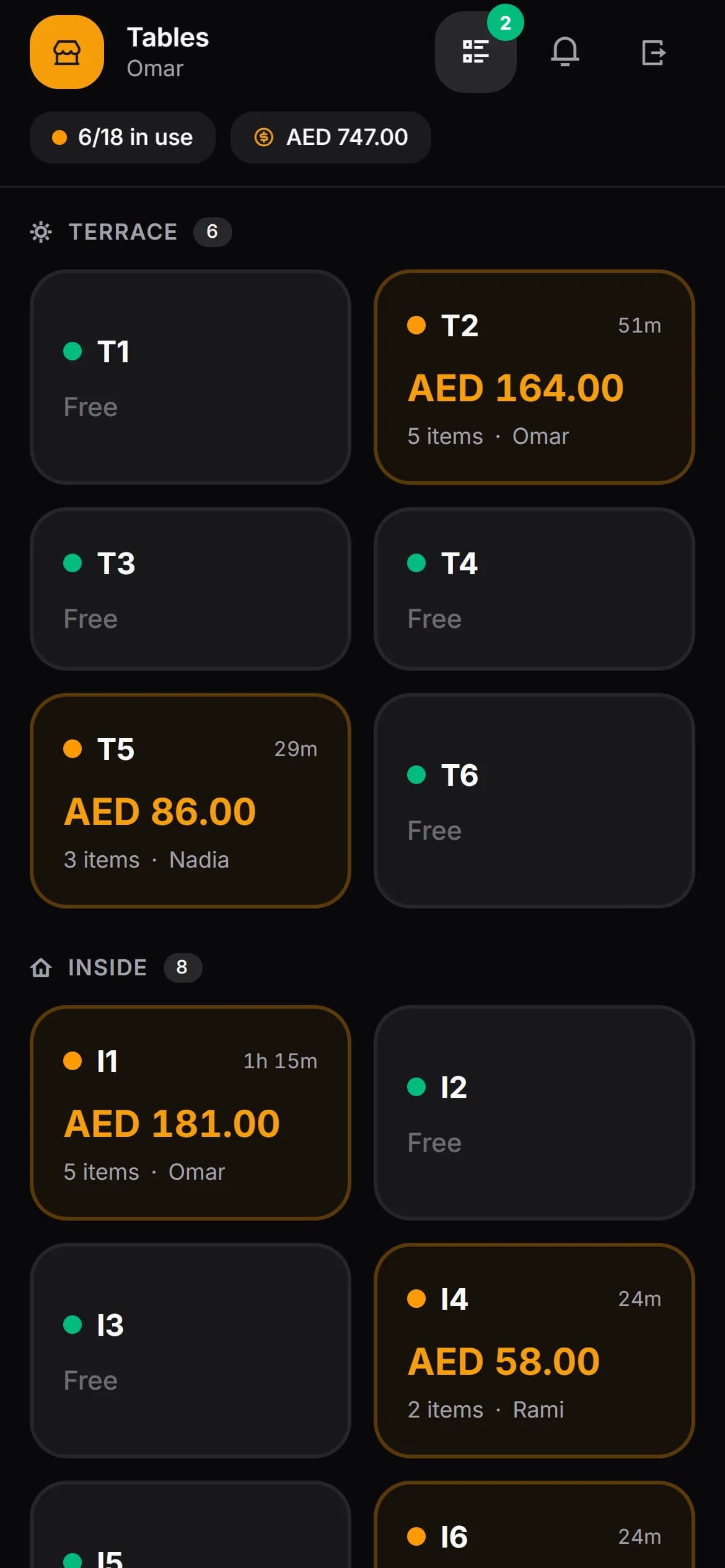
Three states, told apart at a glance
Each tile is colour-coded, and an occupied one carries its elapsed time and its running total. That is the information a host needs while standing at the door with a queue behind them.
Empty
Nobody on it. Seat the next group without walking the room to check.
Occupied
An order is open. The tile carries how long it has been running and what is on it so far.
Waiting for the bill
They have asked to pay. This is the state that costs you money when it is missed.
When the room changes
Guests move. The order should move with them
Both of these happen from the bill screen, in the middle of service, on a phone. Whether waiters are allowed to do them is a setting you control.
Move an order to another table
The group moved from inside to the terrace. The order goes with them, nothing is retyped, and the old table frees itself. If the table you picked already has an open order, the system stops you and says so rather than quietly mixing two bills.
Merge two tables into one bill
Two groups became one. Their orders join into a single bill and one table empties. Everything both tables ordered stays on the record.
Both are written down
Every move and every merge is stored with which tables, which order and which member of staff. When a bill looks strange the next morning, the history is there.
Two waiters, one table
You can see who is already on it
On a busy Friday two waiters take the same table’s order thirty seconds apart and the kitchen makes everything twice. Here, the moment someone opens a table, everyone else watching the floor sees their name on it.
It updates live, and it tidies itself up — a phone that goes flat or loses signal stops holding the table a few minutes later, rather than blocking it for the rest of the shift.
- See who is viewing a table, live, as it happens
- Waiters assigned to an area see that area
- Waiter calls from a QR code land on the same screen
- Every move, merge and cancellation carries a name
- One table opens on the phone, the tablet and the desk alike
Setting up your room
Shaped like your venue, not like a spreadsheet
Areas, with their own icons
Terrace, inside, bar, garden, first floor. Rename one and every table follows; remove one and the tables stay, they just lose the label.
A floor plan you draw
Switch from the grid to the plan view and drag tables where they actually are, then zoom in or out. New staff stop asking which one is table nine.
Up to a hundred tables in one go
Bulk-create with a name prefix and a starting number, with a preview before anything is saved. Setting up a venue is minutes, not an afternoon of typing.
Seats per table
Capacity is stored per table, so a party of six is not sent to a two-top.
Your own order
Drag tables into the order your staff think about them in, rather than the order they were created.
History is protected
A table with an open order cannot be deleted. Neither can one that has ever taken an order — you deactivate it instead, and last quarter’s reports still make sense.
Afterwards
How long people really sit
Everything the floor does is recorded, so the questions you argue about in the office have answers. Pick a date range and read them.
- Average time at a table — overall, per area, per table
- How many times each table turned over, by day
- The hours you are genuinely busy, not the ones you assume
- How full each area is right now, and how full it has been
Questions people actually ask
- Can two waiters end up serving the same table?
- You will see it before it happens. When someone opens a table, everyone else looking at the floor sees that they are on it, live. It is a small thing that quietly removes the duplicate order and the argument that follows.
- Can a waiter be limited to one area?
- Yes. Each waiter can be assigned the areas they work, and they see those tables. Leave the assignment empty and they see everything, which is what most small venues want.
- Do I have to draw a floor plan?
- No. The grid view, grouped by area, is the default and plenty of venues never leave it. The plan view is there for rooms where position genuinely matters, like a large terrace.
- What happens to a table when the bill is paid?
- It empties itself once nothing is left to pay, including when a bill has been split across several payments. There is also a way to clear a table by hand when something has been settled outside the system.
- Can I tell whether I need more tables or faster service?
- That is what the table reports are for. Average time at a table, overall and per area and per table; how many times each table turned over per day; the hours you are actually busy; and how full each area has been. It is usually service, and the numbers will say so.
- Can I see the floor when I am not there?
- Yes. The owner’s view is a browser page, so the floor is readable from home, from another venue, or from an airport.
Lay out your room and see how it reads
Thirty days, every feature, no card. Setting up the tables is the first ten minutes.