What makes a coffee shop different
A café is not a small restaurant, and a till that assumes otherwise costs a season of irritation. The difference starts with the order itself: a restaurant order is a line on a ticket, while a coffee order is a configuration — the drink, then the milk, the size, the shots, the syrup, each of them a place the till can help or hinder.
Then there is the clock. A coffee shop's trade arrives as a wave — the same ninety minutes every morning, the same queue of people who know exactly what they want before the door shuts behind them. The till's job in that wave is to stay out of the way; a system that adds a tap or two per order adds them sixty times before nine o'clock.
And last, the room. Many coffee shops are counter-led: the order is spoken across the counter, paid on the spot and carried away by the customer. Others are table-led and behave like cafés in the older sense. The two shapes want different things from a till, and the last section of this guide takes them apart honestly.
Drink options, taken at speed
The test for option handling is blunt: take a flat white with oat milk and an extra shot, and a cappuccino with soya, and count the taps. Six or so is workable; fifteen is a queue. Watch someone from the staff do it on a demo account, not the salesperson — the difference between those two performances is the difference between your Tuesday and theirs.
Good option handling has a recognisable shape, whatever the brand on the box. Options live in named groups — milk, size, extras — so they are chosen, not remembered, and sensible defaults mean the common drink is one tap and a confirmation. The groups are reusable: oat milk is defined once and appears everywhere milk appears. And when a choice carries a price difference, the till applies it itself — nobody charges an extra shot from memory at 08:45.
The counter queue is the exam
Everything else on the feature list is secondary to what happens between the door and the till in the morning. Count the steps in a full transaction — order in, options on, total, payment, receipt if wanted — and count them again when the connection hiccups. Then count what the staff have to remember: a till that keeps a table of open orders is doing quiet work that a pile of paper cups with names on them does badly.
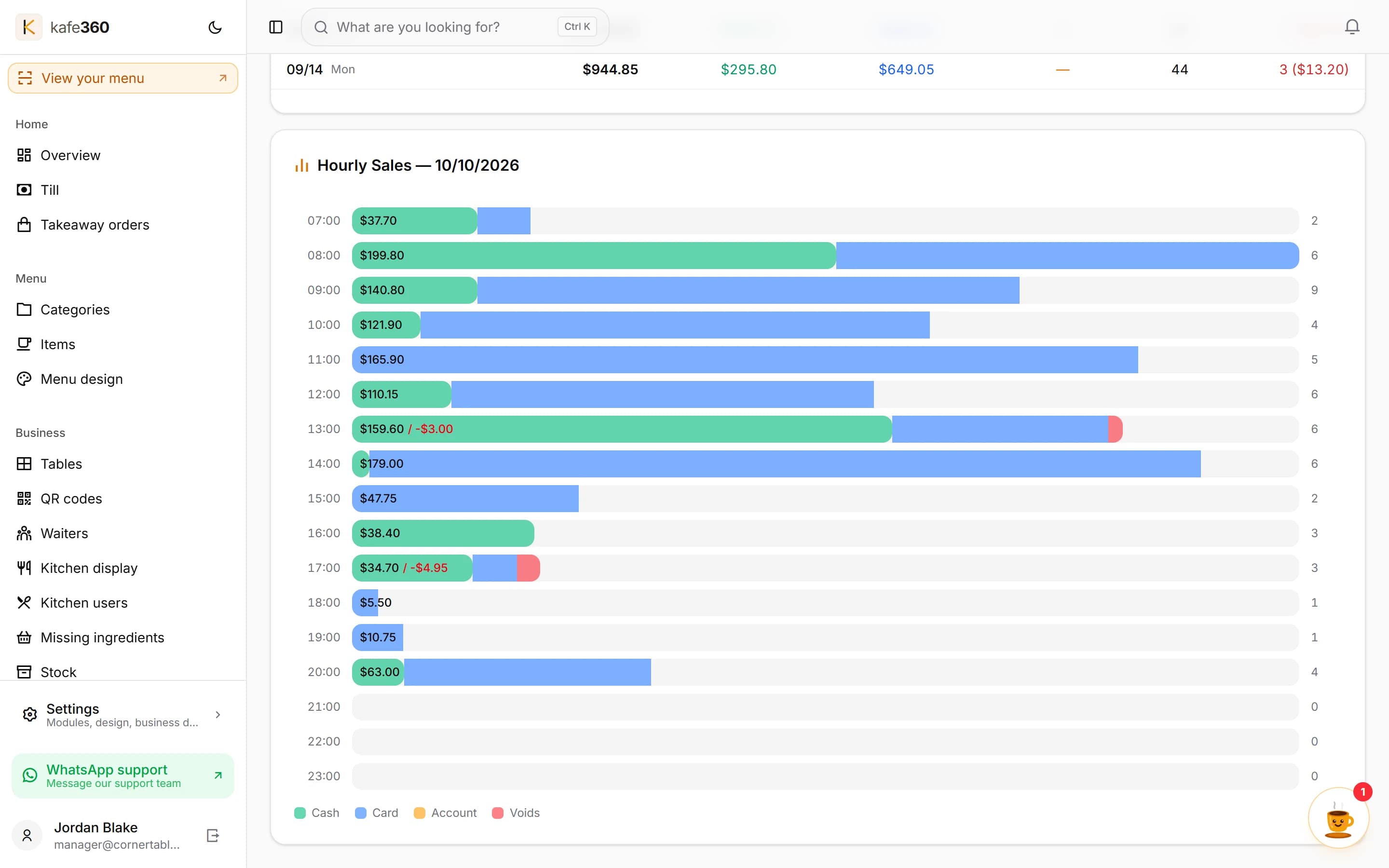
The sales pattern itself is worth reading after the fact, not only surviving. Which hour actually pays for the day, which drink quietly carries the margin, whether the afternoon ever justifies the second barista — the answers are in the till's records, and a system that shows the day by the hour turns them into something you can act on rather than re-derive every month.
One screen, or a bar screen
Where the drinks are made says what the ordering chain has to look like. In a small room the person at the till is the person on the machine, and no second screen is needed — the order is visible because it never left. The moment making and taking are different people, something has to carry the order between them: a bar screen, a printed ticket, or a shout.
The coffee-shaped question is whether that second screen can show drinks the way a bar works rather than the way a kitchen works — by drink type as much as by order, so the barista can read the queue of flat whites rather than a list of tables. Ask the supplier directly; the general idea of a kitchen display is covered in our glossary entry on kitchen display systems, and plenty of systems will happily show you theirs making coffee badly.
Beans, milk and waste
Coffee stock has a shape most tills handle poorly: it shrinks by the drink, not by the box. A kilo of beans is some number of doubles; a litre of milk is some number of lattes — and the honest way to count both is recipes: define what a flat white contains once, and the stock knows every time one is sold. Counting boxes on shelves instead tells you what you bought, never what you wasted.
Kafe360 is built along these lines — drink options go in as reusable groups whose price differences apply as they are chosen, recipes deduct the beans and the milk as drinks sell, and the hourly sales chart shows the morning for what it is.
Waste is the third current in the stream, and it is worth asking any supplier where spillage, the dropped jug and the staff lunch live in their records. A system that only knows what sold will let the arithmetic drift all year and blame the barista in December.
The checklist to take to any demo
Take this to every conversation with every supplier, and score them in front of the salesperson:
- Taps for five real drinks from your own menu, done by your staff — counted, not estimated.
- Queue speed — total taps and payment steps for a take-away card sale at rush hour.
- The second screen — whether one exists at all, who clears a drink from it, and whether it can read by drink rather than by table.
- Stock — recipe-based deduction for beans and milk, waste recording, and some warning when a level runs low.
- Discounts — happy-hour pricing, staff drinks and the loyalty stamp you have not thought about yet.
- Loyalty — whether it exists at all, what it costs on top, and what happens to the history if you leave. Better the answer is known than discovered.
- Card payment — integrated into the till in one step, or your own terminal and one extra tap to record it; whose device, whose fees, whose contract.
- The outage question in writing — what stops when the line drops, and what the staff do for the ten minutes that follow.
- End of day — what the cash-up takes, and whether the Z-report matches what the card terminal says without a spreadsheet to reconcile them.
Counter-led or table-led — an honest split
Some coffee shops should not buy this category of system at all, and it is better said here than in a demo. A counter-led shop where the queue is the business and every sale wants to be one step from order to receipted payment is genuinely better served by a card-integrated terminal system — reader and till as one machine, one contract. That is not a failure of nerve; it is a different room wanting a different tool.
A table-led café wants the opposite spine: orders taken where the guests sit, a bill that belongs to the table rather than the counter, and a menu that can be read from the table itself. There, phone-based ordering and a QR menu do the heavy lifting that a bolted-down terminal never will.
| Counter-led coffee shop | Table-led café | |
|---|---|---|
| The order is taken | Spoken across the counter, paid at once | At the table, by a waiter or by the guest from a code |
| What the till must be | Fast, fixed and one-handed; card-integrated if possible | Mobile; a screen in the pocket rather than on the counter |
| Card payment | Wants the single fused step of a terminal system | Often the waiter's terminal and a recorded payment; slower is tolerable at the table |
| Menu reading | On the wall board; the menu system matters less | On the table itself — a live QR menu earns its keep here |
| Stock and waste | Beans and milk by recipe; the margin lives in the queue | The same recipes, plus rounds and table service to account for |
Rooms that do both — a counter in the morning and tables at the weekend — are the commonest shape of all. Ask early whether one system covers both without a second subscription.